Author: Alex Barthel

  • Seller Guidelines | Accounts Category

    These guidelines apply to all listings in the Accounts category. Accounts must be legitimate, accurately described, and fully transferable with clear access information. Failure to follow these may result in listing removal, suspension, or loss of selling privileges.

    1. Access And Permissions:
      • Any Verified Seller can list accounts on Playerbay. Sellers must meet standard verification requirements as outlined in the Seller Rules. Some games and services may require additional verification – See [RESTRICTED CATEGORIES] for details.
    2. What Can Be Sold
      • Sellers may list accounts that provide full access (email login, and password, plus account login and password), accurately represent rank, level, items, currency or any other advertised information, and include any additional login or recovery information they buy needs to take full control.
      • The Following are STRICTLY prohibited.
        • NFA, Shared, Offline, rented or limited access accounts; keyword or tag spam in the offer description; misleading description or titles; stolen, hacked or unlawfully obtained accounts; and accounts that cannot be fully transferred to the buyer.
    3. Listing Requirements.
      • Titles and Descriptions: Include the associated Platform or Version (PC, Xbox, Mobile) Region, or any linked platform (e.g., Steam, Epic). Show the current rank, if the rank has reset, list the account under “Unranked.” Describe exact progress, in-game inventory, cosmetics any any account restrictions. Do not use ranges.
      • Important Account Information: Disclose any penalties on the account, such as bans or mutes. Promises of “Lifetime Warranty” are not allowed. Instant delivery listings must contain the actual account details at time of listing.
      • Clear Titles: Titles must reflect the exact account content without exaggeration or false claims. Keep them short and descriptive.
    4. Account Transfer and Responsibility.
      • Sellers must NOT access or recover a sold account after the sale unless specifically request by the buyer. Sellers remain liable for account issues even after the warranty period ends, and may not state otherwise in the order chat.
    5. Protection Period.
      • All account sales include a protection period (typically 5-14 days). During this time, buyers may request a refund or re-delivery if the account fails, or access is lost.

    Dispute Handling

    Sellers must assist with the recovery and resolution on their own and respond within 12 hours. Treat all buyers with respect, regardless of how they communicate – you represent the marketplace. Please provide as much evidence as possible during any dispute. If you know the account comes from a sketchy or unreliable source, it’s often better to cancel or replace the order proactively rather than risk a negative outcome. PlayerBay has zero tolerance for recovery violations, meaning any seller who reclaims an account after it’s sale will face immediate action. Refusal to provide timely assistance will result in order cancellation. You have 3 days to resolve the issue before PlayerBay support makes a final decision.

    Violations and Penalties

    1. Misleading or False Account Info: First offense results in listing removal and a refund. Repeat offenses may lead to suspension or restriction from selling in the affected Category.
    2. Failure to Provide Full Access on Delivery: First offense results in a warning, suspension, and refund. Repeat offenses result in permanent suspension.
    3. Post-Sale Access or Recovery: Permanent suspension on first offense.
    4. Illegal Account Offers: Permanent suspension on first offense.
    5. Instant Delivery With No Account Details: First offense results in a warning, suspension and refund. Repeat offenses result in a permanent suspension.
    6. Keyword Spam: First offense results in a warning and suspension. Repeat offenses result in a permanent suspension.
    PlayerBay reserves the right to take stronger action depending on the severity of the violation.
  • Seller Guidelines | Items Category

    These guidelines ensure that all item listings on PlayerBay are accurate, safe, and trustworthy for both buyers and sellers. Non-compliance may result in listing removal, seller suspension, or loss of selling privileges.

    1. Access and Permissions
      • Any Verified Seller can list items on Playerbay. Sellers must meet standard verification requirements as outlined in the Seller Rules.
    2. What Can Be Sold
      • Only digital in-game products are allowed, including skins, cosmetics, accessories, crafting materials, consumables, equipment and limited items with clearly defined attributes (Specific Rarity or skin).
      • The following items are strictly prohibited: random or lottery-style offers (e.g., “Open for a chance to get rare loot”), bundles where the contents are unspecified or randomly determined, physical products or non-digital goods, and any offer that requires off-platform communication or transactions.
    3. Listing Requirements
      • Titles and Descriptions: Use clear, accurate titles so buyers know exactly what they are purchasing. Describe items attributes in detail – exact item name, quantity, game, and server or region if applicable.
      • Images: Only use images you own, or have permission to use.
      • Accuracy: Do not use ranges (e.g., 10k-50k), vague labels (e.g., Maybe Rare), or placeholder text.

    Fulfillment and Delivery
    1. Deliver Items within the delivery time stated in your offer. Only mark an order as delivered once the item has been fully transferred to the buyer.

    Violations and Penalties

    1. Misleading Listings: First offense results in a warning and suspension. Repeat offenses can result in an extended suspension based on prior history.
    2. Fake Images or Content: First offense results in a warning and suspension. Repeat offenses can result in an extended suspension based on prior history.
    3. Off-Platform Payment Requests: Immediate suspension on first offense.
    4. Delivery Failure: (out of stock, wrong credentials, unresponsive seller, etc.): First offense results in a refund issued in the buyer’s favor. Repeat offenses may result in restriction from selling in the affected game category.
    PlayerBay reserves the right to take stronger action depending on the severity of the violation.

  • How to sell an account?

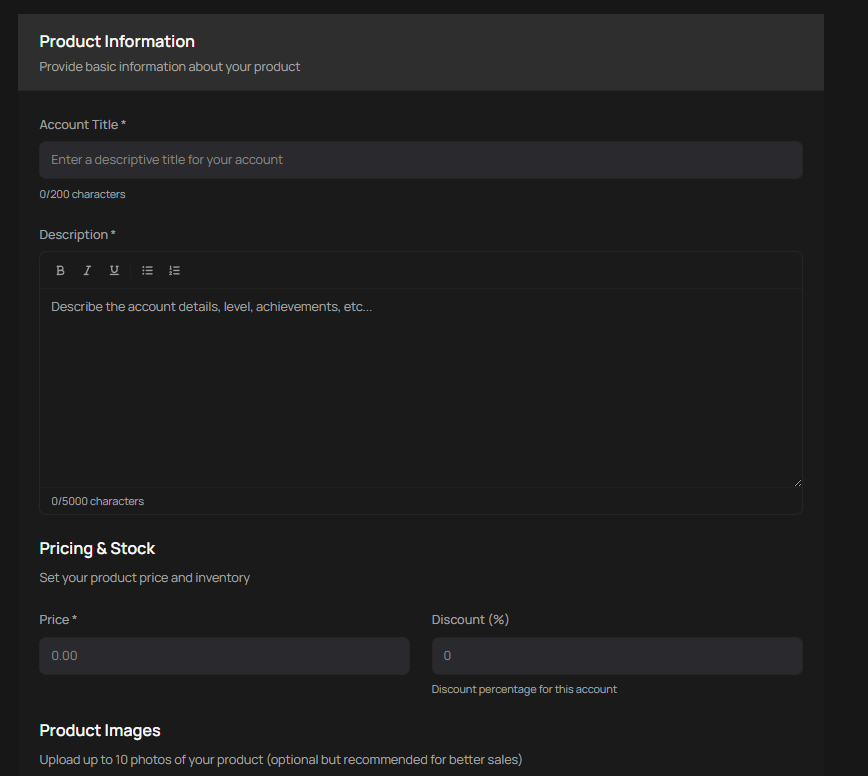
    To list an account for sale, your PlayerBay account must be verified. When creating your listing, include the most important details about the account in the title and provide as much relevant information as possible in the description. You can select a delivery time and upload up to 10 images of the account. Set your asking price and submit your offer.

    What Information to Provide
    You must provide the login username, password, associated email credentials (if applicable), and any security question answers (if applicable). If an email is attached to the account, you must also provide the buyer with full access to that email. PlayerBay only permits the sale of full-access accounts.
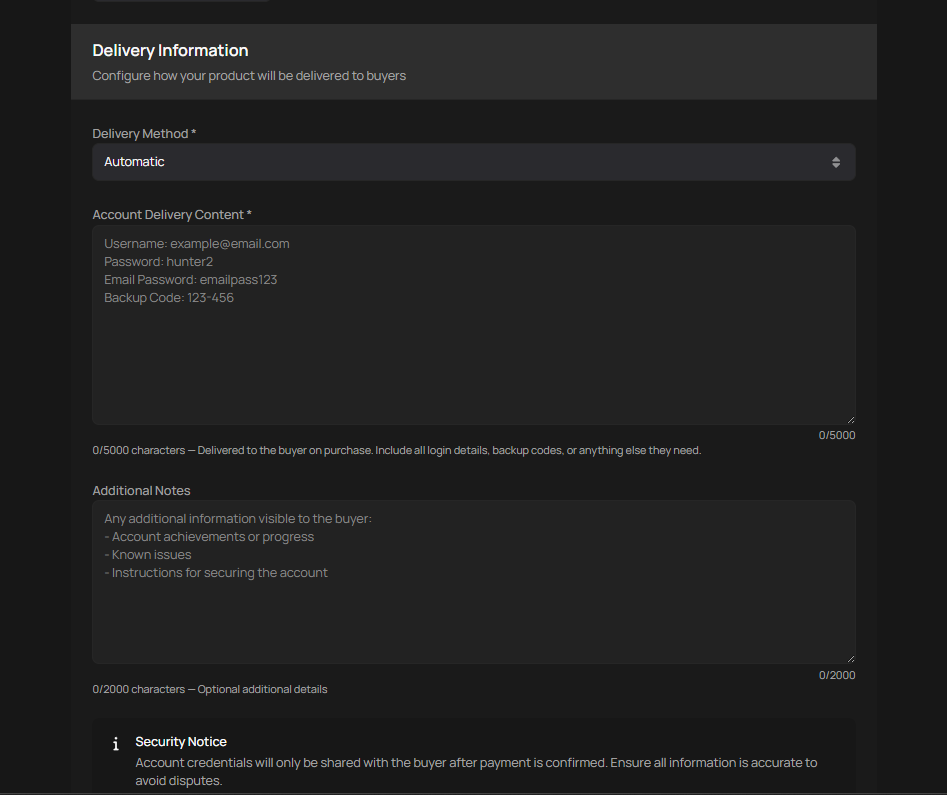
    If using instant delivery, the listing page will ask you to provide the relevant information.

    Once Your Account Sells

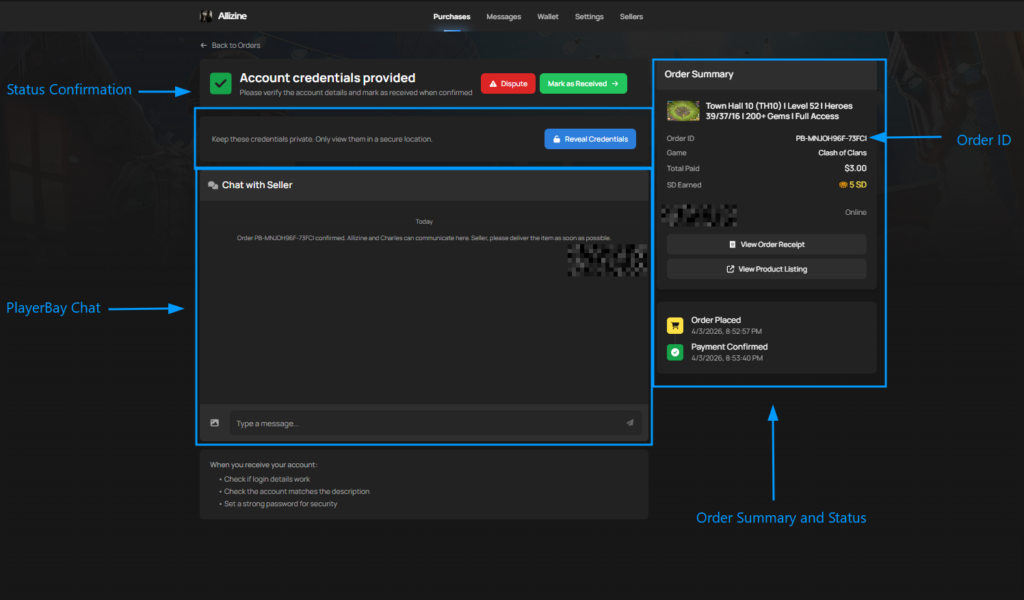
    When a buyer purchases your listing, reach out to them through the platform chat to arrange the account transfer. You’ll need to provide the username, password, email credentials, any security question answers if applicable, and any other relevant login information.

    Where to Deliver Account Information
    If you’re not using instant delivery, all account credentials should be shared through the PlayerBay chat. This gives you access to secure, end-to-end encrypted communication with the buyer. If the account requires an email change, you’ll need to facilitate that by providing any necessary confirmation from the associated email.

  • How to receive notifications about new orders or messages?

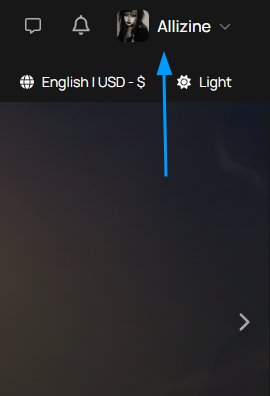
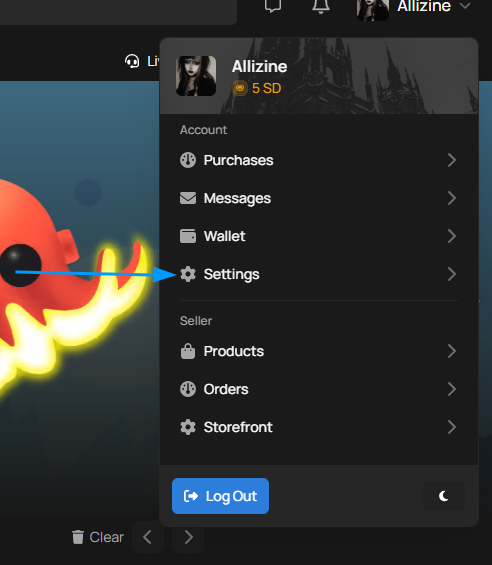
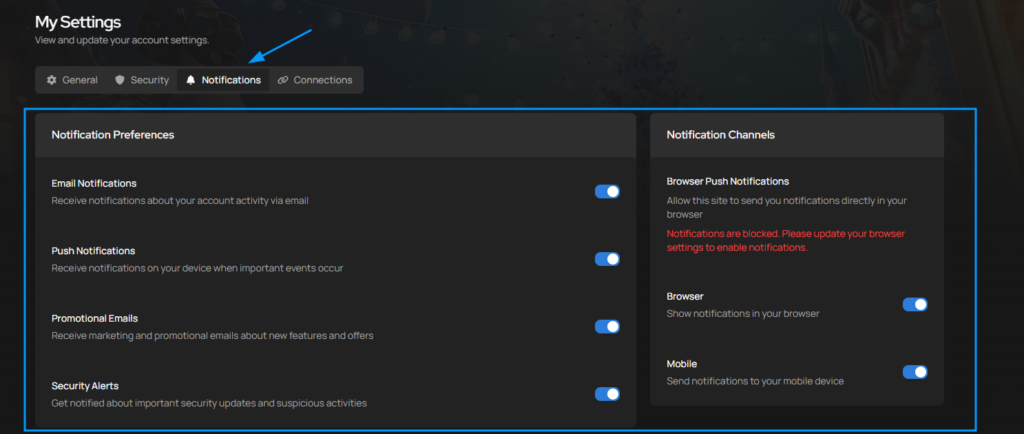
    Below is a visual walkthrough on how to enable notifications on the PlayerBay Platform.

  • How Our Offer Ranking System Works

    PlayerBay uses a scoring system to rank account and item offers, helping buyers find the best deals. Ranks are based on three main factors.

    Seller Reputation | Largest Factor

    Your Track record as a seller carries the most weight. Here’s what we look at.

    1. Positive Buyer Feedback
    2. Dispute Rate
    3. Order Completion Rate
    4. Delivery Performance

    Sellers with fewer post-warranty issues like account recoveries or bans rank higher than those with recurring problems.

    Offer Quality

    Each individual listing is also evaluated. Offers with shorter delivery times are favored, while longer delivery windows typically score lower. Titles matter too, listings with popular, relevant search terms rank higher.

    Market Fairness Boost

    This factor keeps PlayerBay balanced and prevents any single seller from dominating the site. If you list multiple competing offers for the same game and region, each additional listing gets a smaller boost than the last. There’s also a small randomization built in to keep results fresh.

    How Scores Update

    Seller score are re-calulated regularly based on recent performance. Offer quality scores update whenever you change relavant listing details. Market fairness boost scores reset when you make significant changes to an offer or it’s status, and are recalculated regularlyfor all active listings on PlayerBay.

    Tips to Improve Your Rankings

    Focus on your reputation above all else, deliver on time, resolve issues quickly and keep your buyers happy. Optimize your delivery times by choosing faster options when you’re able to. Write clear, concise and detailed titles using popular search terms. Build up your order history, since more completed sales significantly improve your score.

    We’re always refining the ranking system to improve the experience for buyers and sellers. We occasionally run tests and adjust the formulas, and once changes prove valuable, they become permanent. You may notice small shifts in how offers are ranked from time to time as a result.


  • Account Seller Rules

    Before listing accounts, make sure you understand the rules below. Breaking them can result in a temporary or permanent suspension of your seller account.

    Also read: Seller Rules


    Listing Rules:

    1. Keep Listings Accurate and Informative: Your descriptions should clearly cover the product’s features, delivery details, any limitations, and anything else the buyer needs to know. Don’t use exaggerations, false claims or irrelevant content.
    2. No Misleading Descriptions or Titles: Don’t use deceptive language like “Lifetime Warranty” or label an account as full access when it isn’t. Also Read : Keyword Rules FAQ
    3. Disclose All Account Limitations: If the account has restrictions like region-locked purchases on a steam account- state that clearly in the description.
    4. No Listing Manipulations: Any attempts to game the system for better visibility will result in a suspension.

    General Account Rules:

    1. Full Access Only: Shared, rented, or partial-access accounts are not allowed. You must provide full access, including email and all relevant login credentials.
    2. Protection Period: Every account sale includes 5-14 day Buyer’s Protection. If the account stops working, gets banned, or is recovered during this period, the sale is canceled and the buyer is refunded.
    3. Seller Liability after Buyer Protection: You’re not off the hook once the Buyer Protection period ends. If an account is recovered after Account Protection expires and you’re found at fault, you may be required to issue a refund and could face suspension. Keep communication open with buyers even after the protection window closes.
    4. Zero Tolerance for Account Recovery: Recovering a sold account is a permanent suspension offense. If a buyer reports recovery and you refuse to help them regain access, your account will be banned.
    5. You’re Responsible for What You Sell: Reselling accounts is allowed, but you’re still fully liable for any issues that come up with it.
    6. No Access After the Sale: Once the account is sold, do not log in, recover, or use it or any related credentials unless the buyer asks you to.
    7. Dispute Outcome: If a dispute is resolved in the buyer’s favor, you’re permitted to recover and secure the account where possible.
    8. No Stolen or Hacked Accounts: Selling accounts obtained through hacking, theft, or any other illegal means is strictly forbidden.
    9. Instant Delivery Must Be Accurate: If you’re listing an account with instant delivery, the account details must be correct at the time of listing.
    10. Use Recognized Email Providers: We strongly recommend using well-known email domains for listed accounts. Using lesser-known providers increases the risk of order cancellation during a dispute. Accepted providers include Gmail, Outlook/Hotmail, Yahoo/Ymail, AOL, and ProtonMail. If you use a different provider, you must give the buyer a direct link to the login page and ensure the domain is secure and supports English.

    Game-Specific Rules:

    1. Fortnite: Clearly state which platforms the account can be linked to (e.g., Xbox + PlayStation, PC + PlayStation). By listing a platform, you’re guaranteeing the buyer can use it there. Inform buyers about risks like not contacting Epic Games support – if you don’t, you’ll be held responsible in a dispute. If the email can’t be changed immediately, say so in the description and provide full access to the linked email.
    2. Valorant: List accounts in the correct rank and use the current season’s rank. Accounts leveled using cheats or illegal software are not allowed.
    3. GTA 5: Specify the platform (Epic Games, Rockstar, PS5, etc.) and the game version ( Enhanced, Legacy, etc.). FiveM accounts are allowed as long as you clearly state that GTA V is required to play.
    4. OSRS and RS3: Provide all recovery information to the buyer, including recovery questions, original email, old passwords, and membership payment methods where applicable. If the account has bans, offenses, or was botted on, disclose that in the description.
    5. Call of Duty: State which version of CoD the account is for and which platforms can be linked. Unlink any unnecessary login methods and provide full access to all remaining linked logins.
    6. League of Legends: List accounts in the correct rank category using the current season’s rank. Disclose any offenses on the account. Accounts with offensive or inappropriate usernames cannot be sold and will be canceled.

    All listings must represent authentic, privately used accounts that reflect normal in-game progression.
  • Declined Card Payment?

    Card payment not going through? Here’s how to troubleshoot it.

    Accepted Cards :

    • VISA
    • MasterCard
    • Maestro
    • American Express
    • DinersClub
    • Discover
    • JCB
    • UnionPay

    Troubleshooting Steps:

    Before trying anything else, make sure your card has 3D Secure (3DS) enabled, international payments are turned on, your account has enough funds to cover the order total plus any fees, and the card you’re using isn’t a prepaid card.

    Still not Working?
    If none of the troubleshooting steps resolves the issue, try a different card, or switch to a different payment method altogether. Alternative options include Google Pay, Cashapp and Crypto.

  • Payment Methods

    We offer a range of payment options to make checkout easy:
    Cards: Visa, Mastercard, Maestro, American Express, Diners Club, Discover, JCB, and UnionPay – both credit and debit cards are accepted.

    Digital Wallets: Google Pay (available in Chrome on Android or Windows), Samsung, and Cashapp Pay.
    Bank Payments: Pay directly through Banconnect, or log in with your US Bank for a seamless bank payment.
    Cryptocurrency: Pay with crypto at checkout.

    More Payment Options to Come.
  • Issue with your Order?

    We get it — order problems are frustrating. Here’s how to get things resolved quickly.

    1. Contact the Seller
      By Using the PlayerBay Chat, you can directly chat with the seller

      2. Contact PlayerBay Support

      If the seller isn’t responding or you can’t reach a resolution, you can raise a dispute directly from your order page using the “Dispute” button.

      Note: This option is only available when your order status is “Confirmed.” If the status shows “Completed” or “Received,” the button won’t appear.

      What happens after you raise a dispute:
      Both the buyer and seller get 24 hours to cooperate, share proof in the order chat, and try to work things out. From there, our Dispute Team reviews everything fairly and makes a final call. If the dispute is resolved in your favor, you’ll receive a refund. Most disputes are fully wrapped up within 3 days.

      Our Dispute Team is here to make sure every purchase ends on a fair note – they’ll review the situation impartially and work with both sides to find the right resolution.


    1. Currency and Item Delivery Methods

      1. In-game Delivery Via Trading
        • How it Works:
          • For this method, at checkout you’ll asked to provide your in-game username . Once your purchase is complete, reach out to the seller to set up a time and meeting spot in-game for the trade.
          • Some sellers support automatic delivery, as long as your details are correct at checkout, the item lands in your inventory with no coordination needed.
        • Tips for a Smooth Trade: Double-check that your in-game username is correct before purchasing, and respond quickly when the seller reaches out so you can wrap up the trade without delays.

      1. Delivery via Account URL Linking
        • How it Works:
          • At Checkout, you’ll provide your account URL (Such as a steam trade URL). The seller delivers the items straight to that account.
        • Tips for a Smooth Trade: Make sure the account URL you’ve entered is correct.

      1. Gifting Method
        • How it Works:
          • The seller either sends items directly to your account through the in-game gifting system using your username, or provides you with access to an account where the items are stored so you can handle the transfer yourself.
          • This method gives you flexibility. Whether you want the seller to handle everything or prefer to manage the delivery on your own, especially if you need to send items to a different account.
        • Tips for a Smooth Trade: If the seller gives you account access to complete the gift, follow their instructions closely to make sure the transfer goes through without issues.

      Key Reminders for a Succesful Trade.

      1. Communication : Keep communications open with your seller, especially for trades that require some coordination. Quick, clear messages go a long way in avoid delays or mix-ups.
      2. Verifying Your Details: Double-check your username, account URL, or any other info before submitting your order. One small typo can hold up the entire trade.
      3. Know Your Delivery Methods: Read the product description so you know how the item will be delivered. Knowing what to expect upfront helps you prepare and keep the process stress-free.

      By Following these steps, you’ll be set for a smooth, hassle-free trade every time.