Follow these steps to enable 2FA on your Playerbay Account:
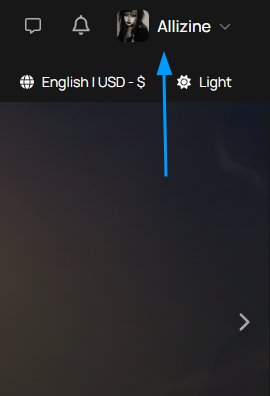
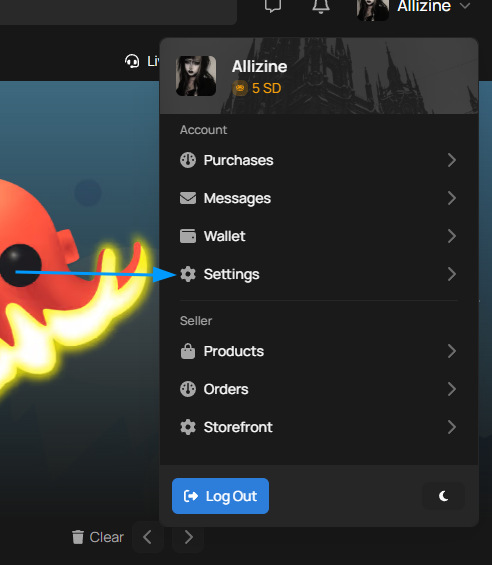
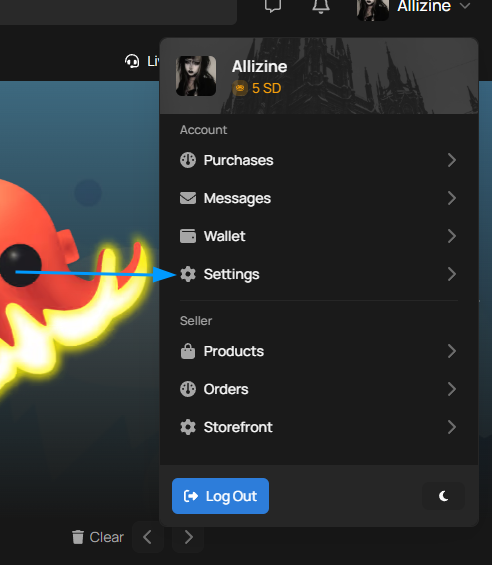
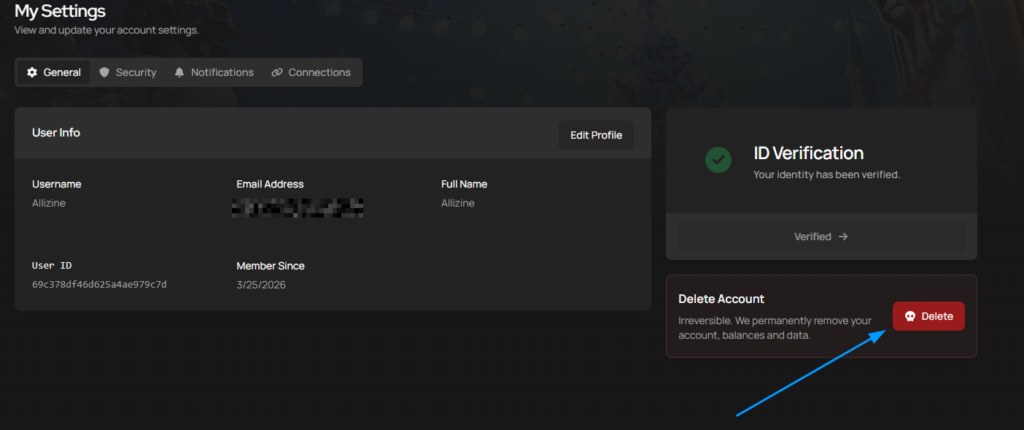
Step 1. Navigate to your settings page.
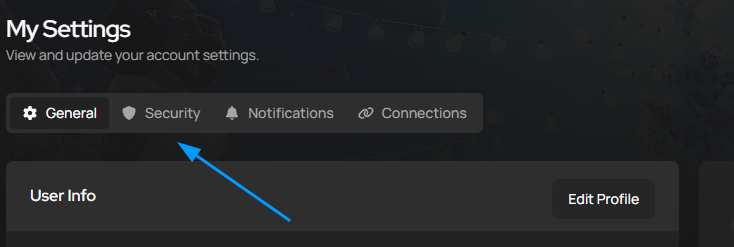
Here you will see a few options at the top, select security
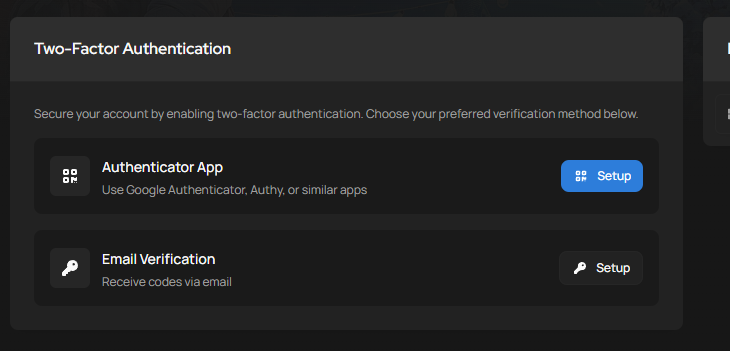
The two-factor Authentication options are presented before you on the Security page.
Lost Access to you 2FA?
If you’ve lost access to you two-factor auth device or app, you’ll have to reset it. Contact our live support team and we will walk you through it.
Identity Verification:
For You security, we will need to verify your identity before making any changes to your 2FA. You’ll be asked to provide a selfie of yourself holding a valid ID document and a piece of paper clearly showing today’s date. This ensures your account stays in the right hands.
If you violate PlayerBay’s Terms of Service or Seller Rules, your account may be suspended temporarily or permanently.
What You Can and Cannot Do While Suspended: While Suspended, you can still access existing orders, use the chat and finish any ongoing sales. However, you will not be able to deposit or withdraw funds, purchase offers, or list anything for sale.
Zero Tolerance for Fraud
PlayerBay has a STRICT zero-tolerance policy for scamming and fraud. Any user involved in fraud, scam, chargebacks, or similar activities will be permanently banned with no exceptions.
Other Offenses
All other violations are reviewed on a case by case basis. Depending on the severity, you may receive anywhere from a one day suspension to a permanent ban.
Accessing You Balance
Suspended users who have a remaining balance can still receive their funds. If you are a seller with a balance and your account is suspended, contact our support team through live chat to arrange a withdrawal. In cases involving fraud, PlayerBay may hold your funds for up to 30-60 days before allowing the withdrawal.
Having an issue with an account you have purchased? Here’s how to get it resolved effectively:
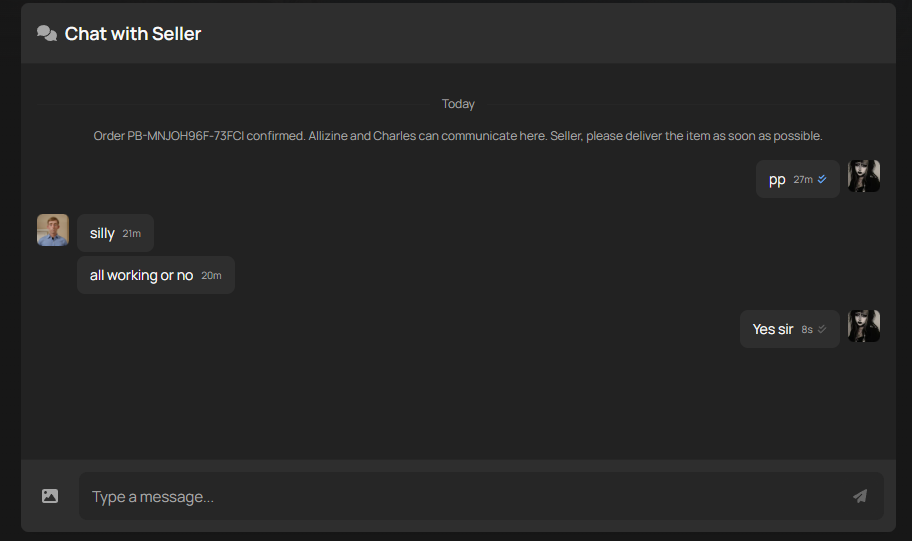
Step 1: Contact the seller directly through your order page.
If the account details have already been revealed, the seller will have up to 12 hours to respond, taking into account possible time zone differences.
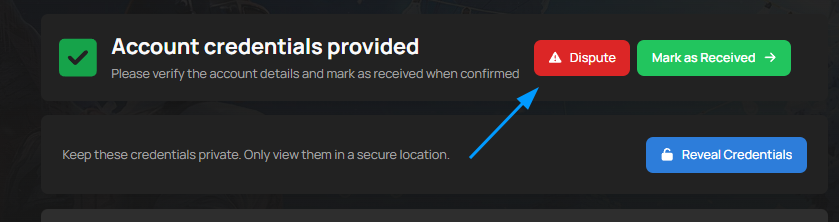
Step 2: Raise a Dispute If Needed:
A dispute can be raised if there’s an issue that hasn’t been resolved through direct communication with the seller within 5 – 14 days (all accounts come with a 5-14 day Protection period for buyers. During this time, if the account stops working, gets banned, or is recovered, the sale will be canceled, and a refund will be issued)
For more information regarding the dispute process click here
PlayerBay is open to sellers in most countries worldwide. However, under current platform policies we are unable to onboard sellers from the following countries.
Afghanistan
Belarus
Cuba
Iran
Myanmar
North Korea
Russia
South Sudan
Ukranian Territories of:
Donetsk
Luhansk
Crimea
Sevastopol
If your country is not on the list, you are eligible to sell on PlayerBay.
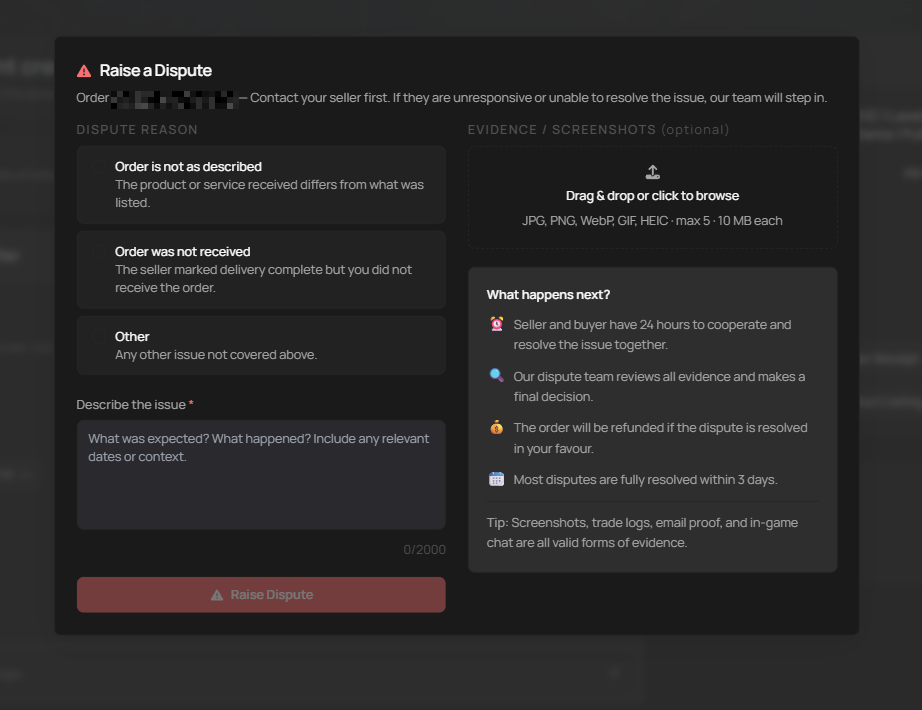
Your first point of contact should always be with the seller. Most sellers want to keep their buyers happy and are willing to resolve issues quickly. Only raise a dispute if you’ve already reached out to the seller and haven’t been able to resolve the issue, or if the seller is unresponsive or uncooperative and the delivery window has passed.
When Can You Raise a Dispute?
A Dispute can be raised when there’s an issue with your order that hasn’t been resolved between you and the seller, and the delivery period is over.
The “Dispute” button will only appear when your order status is “Delivered.” if your order status shows “Completed” or “Delivered.”, the option is no longer available.
If you run into a problem after an order is already completed, you can contact our 24/7 customer support team and we’ll help from there.
Disputes are typically raised for one of the following reasons:
The Seller is unresponsive
The product received does not match what was described in the listing.
The order wasn’t delivered within the delivery window.
The account you purchased has incorrect or non-functioning login details.
What Happens After You Raise a Dispute
Once a dispute is raised, both the buyer and seller have 24 hours to cooperate and resolve the issue together, after that window, our Dispute Team reviews everything fairly and makes the final decision. If the dispute is resolved i your favor, you’ll receive a refund. Most disputes are fully resolved within 3 days.
Category-Specific Timelines:
For accounts, the seller has 12 hours to respond. If the seller doesn’t take action within the guarantee period specified in the order, the dispute may be closed in the buyer’s favor with a full refund. If the seller resolves the issue in time, the dispute is closed in the sellers favor.
For Currency, top-ups, and item orders, the seller has 2 hours to provide proof of delivery. If the seller fails to provide the necessary evidence within that window and no solution has been offered to the buyer, the order may be fully refunded.
How to Provide Evidence
Within minutes of a dispute being raised, our Dispute Team begins reviewing your order chat. Both buyer and seller cooperation is critical, you’ll both need to provide all available evidence of any issue. This includes: Screenshots, proof of the account not working or any ban / suspension, in-game chat logs, or any other relevant information.
Our Dispute Team reviews the following when making a decision: The seller’s product description and title, screenshots of emails providing login credentials were changed, evidence that the account doesn’t match what was described, and trade screenshots, videos, or any other proof that the order was or wasn’t delivered to the buyer.
Tips for Sellers handling a dispute.
Communicate with the buyer and try to understand the issue. Upload any proof from your side that could help solve the situation. Respond within 12 hours. If possible, offer a replacement or issue a refund to resolve things quickly. If you can’t reach a resolution, provide your evidence and let the Dispute Team make the final call.
How Dispute Are Resolved.
A dispute is resolved in either the favor of the buyer or the seller. if the buyer wins, the order is cancelled and the money is refunded to the buyer. If the seller wins, the order is marked as completed.
Only a small percentage of all orders on our platform result in disputes, but if it happens to you, Know that you are protected and the dispute will be handled as quickly as possible.
Don’t worry, you can sill make purchases and receive payouts even if your local currency is displayed on Playerbay. Here’s how it works:
Purchases: Your payment will automatically convert from your local currency to one of our accepted currencies. The conversion is handled by your bank or payment provider at the time of the transaction.
Withdrawals: When you withdraw funds, they’ll convert to your account’s currency based on the exchange rate set by the payment provider.
Tips for Smooth Transactions: Use an international card or a digital wallet for seamless currency handling. Check your bank’s exchange rates and any conversion fees ahead of time so there are no surprises, and review the conversion rates before completing your purchase.
Why We Don’t List Every Currency: Supporting every possible currency would add significant complexity and cost. Instead, we rely on trusted payment providers to handle conversions securely on your behalf.
If you run into any issues, reach out to our support team and we’ll help you sort it out.
These guidelines apply to all currency listings and orders on PlayerBay. Sellers must deliver currency exactly as described and handle all transactions securely and professionally. failure to follow these may result in temporary or permanent suspension.
Access and Permissions:
Any verified seller can list currency on PlayerBay. All sellers must meet the standard verification requirements outlined in the Seller Rules.
What Can Be Sold
Sellers can only list in-game currency (gold, coins, credits, etc.) and game-related tradable currencies.
All currency must be legally obtained and tradable through the game’s official mechanics.
What is Strictly Prohibited.
The Following are not allowed under any cicumstances:
Using Cheats or exploits to generate currency.
Selling stolen, fraudulently obtained, duplicated or illegally generated currencies.
Sharing, Storing or misusing buyer login credentials
Abandoning orders without a valid reasdon
Requesting Additional payment beyond the listed price
Any trading method that intentionally puts the buyer’s account at risk.
Quality Requirements.
Only mark an order once the fully agreed amount of currency has been successfully transferred to the buyer. Always confirm delivery in chat and make sure the buyer has received the agreed upon amount.
Dispute Handling
Sellers must respond to any issues within 12 hours. Treat all buyers with respect regardless of how they communicate – You Represent the marketplace.
When a dispute arises, provide as much evidence as possible, including screenshots of the trade window, proof of completed transactions, chat confirmations and any relevant in-game transaction log.
If the buyer provides a new username in the order chat that doesn’t match the one in there order summary, confirm the username twice before proceeding or cancel the order.
Keep chats transparent by sharing updates to prevent misunderstandings, refusal to provide timely assistance will result in order cancellations. You have 3 days to resole the issue before PlayerBay support makes the final decision, though depending on the situation, they order may be cancelled sooner. If a partial refund is agreed upon, the seller must contact PlayerBay support with the exact amount already confirmed with thebuyer.
Violations and Penalties
High Order Cancellations: First offense results in a warning and suspension. Repeat offenses result in an extended suspension based on history.
Selling Fraudulently Obtained or Unsafe Currencies: Immediate suspension on first offense.
Unauthorized Access, Tampering, or Theft Involving a Buyer’s Account: Immediate suspension on first offense.
Off-Platform Payment Requests: Immediate suspension on first offense.
PlayerBay reserves the right to take stronger action depending on the severity of the violation.
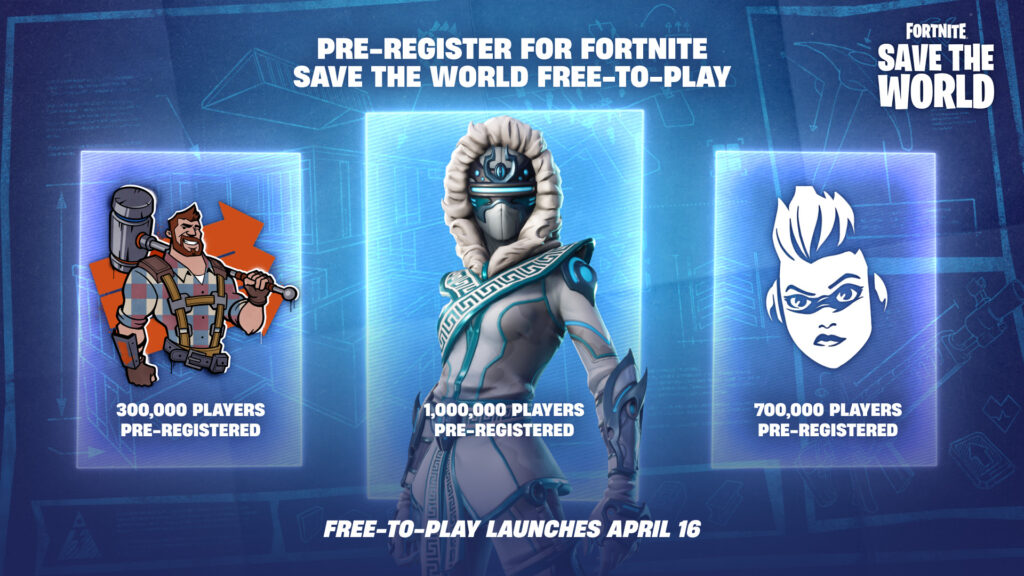
After nearly 9 years as a paid gamemode, Fortnite: Save the World is officially going free-to-play on April 16th, 2026. Epic announced the shift in March, and new purchases of the mode have already been paused since March 11th. Once it goes live, anyone on PC, Playstation, Xbox or Switch 2 can jump in at no cost.
For anyone unfamiliar, Save the World is the original Fortnite Gamemode, a co-op PvE campaign where players build bases, craft weapons and fight off waves of enemies called Husks. It launched in 2017 as a paid Early Access title before battle royale took over and became the Fortnite version most people know today. Despite living in the shadows of Battle Royale, Save the World has maintained a dedicated player base and remained one of the only ways to consistently earn V-Bucks by playing.
What’s Changing
The Save the World gamemode will be completely free to access, Epic is running a pre-registration campaign currently with community milestone rewards – hit one million sign-ups and everyone gets an exclusive hero called Snowstrike. Existing players who already own the mode will receive a Thank You bundle on April 16th, including superchargers, vouchers, and some gold.
The big question a lot of players have is about V-Bucks. Founders – players who purchased Save the World during it’s original Early Access period – will continue to earn V-Bucks through daily quests, Mission Alerts, Storm Shield Defense Missions, and existing challenges. New Free-to-Play players will not have access to V-Buck earnings. That perk remains entirely exclusive to Founders.
Why This Matters for Fortnite Account Trading This is a significant shift for the Fortnite account market. Founder accounts have always carried a higher premium due to the fact they can generate V-Bucks passively. With Save the World now free-to-play no new founder accounts can be created, making those accounts a truly limited commodity. No one can buy their way into Founder status anymore – that window is permanently closed.
If you own a Founder account, it’s long term value just went up. If you’re looking to buy a new one, now is the time to pay attention before the market adjusts.
On the flip side, the influx of new players into Save the World could increase overall interest into Fortnite accounts that have meaningful progression in the gamemode.
The Bottom Line
Save the World going free-to-play is the biggest change this mode has seen since Battle Royale overthrew it in 2017. Whether you’re a buyer or a seller, it’s worth understanding how this change impacts the value of what’s being traded. Founder accounts are now a closed market, and that scarcity is going to grow over time.
We use cookies to ensure that we give you the best experience on our website. If you continue to use this site we will assume that you are happy with it.Accept