Blog

  • Enhanced Security Categories | Additional Verification

    When you register as a seller on PlayerBay, you can start listing products in most categories right away. However, certain Enhanced Security Categories require approval before you can list in them. To sell in these categories, you’ll need to apply and wait for our team to review your request.

    Why Do Enhanced Security Categories Exist?
    Some Categories, particularly certain accounts, subscription services, and top-ups, see a higher rate of fraud and account recovery disputes. Requiring additional verification helps protect buyers and keeps the marketplace trustworthy for everyone.

    Enhanced Security Categories

    You must be approved before listing products in any of the following:

    Accounts (8): Crunchyroll, Discord, Disney+, Epic Games, Fortnite, Netflix, Spotify, and Valorant.

    Items (3): Discord, Fortnite, and Roblox Limiteds.

    Top-Ups (68): 8 Ball Pool, 99 Nights in the Forest, Amazon, Apex Legends, Arena Breakout, Arknights: Endfield, BGMI, Bigo Live, Blood Strike, Brawl Stars, Call of Duty, Call of Duty Mobile, ChatGPT, Clash of Clans, Clash Royale, Crunchyroll, Dead By Daylight, Delta Force, Destiny 2, EA Play, EA Sports FC, eFootball 2026, Elder Scrolls Online, Fortnite, Garena Free Fire, Genshin Impact, Growtopia, Honkai: Star Rail, Honor of Kings, Identity V, League of Legends, League of Legends: Wild Rift, Marvel Rivals, Metin2, Miliastra Wonderland, Minecraft, Mobile Legends, Netflix, Nintendo, Overwatch, Path of Exile 2, PlayerUnknown’s Battlegrounds, PlayStation, Point Blank, Poppo Live, PUBG Mobile, Pokémon Go, Pokémon TCG Pocket, Rainbow Six Siege X, Roblox, Rocket League, Rust, Sea of Thieves, Silkroad Online Türkiye, Sniper Duels, Spotify, Super Sus, TikTok, Valorant, Whiteout Survival, WolfTeam, World of Warcraft, Wuthering Waves, Xbox, Yalla Ludo, ZEPETO, Zenless Zone Zero, and Zula.

    If a category isn’t listed above, you can sell in it immediately after registration.

    How to Request Access
    Open A Live Chat or ticket and request Enhanced Security Category application. Submit your application and wait for a review. We’ll notify you once a decision has been made, either approved, or with details on what needs addressed before you may re-apply.
  • Seller Withdrawals

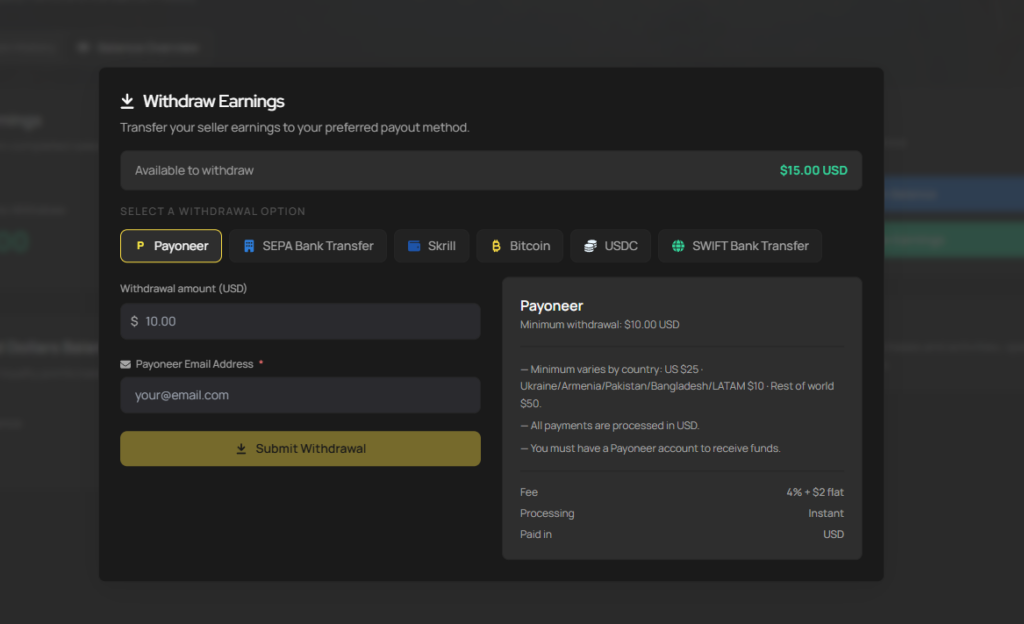
    Once you’ve completed your first successful sale on PlayerBay, you’ll unlock the ability to withdraw those earnings.

    Available Withdrawal Methods:

    Payoneer
    (— Minimum varies by country: US $25 · Ukraine/Armenia/Pakistan/Bangladesh/LATAM $10 · Rest of world $50.

    — All payments are processed in USD.

    — You must have a Payoneer account to receive funds.)

    SEPA Bank Transfer
    (— Processed in Euros (€). USD is converted to EUR at the time of processing.

    — Available only for bank accounts that support SEPA payments.

    — Available for most banks in Europe.)

    Swift Bank Transfer
    (— Processed in your local currency.

    — Your bank may charge additional fees averaging $10 USD. Contact your bank for details.)

    Skrill
    (— Processed in Euros (€). Currency is converted from USD to EUR at the time of withdrawal.

    — The withdrawal address must be registered to you.)
    Crypto

    Every sale adds to your balance — and with flexible withdrawal options, your earnings are always within reach.

    Please note: Most withdrawals are processed automatically. However, BTC, USDC, and SEPA transfers are manually reviewed by the PlayerBay team and may take up to 5 business days to complete.
  • Seller Protection

    Selling safely matters. PlayerBay is designed to protect you from payment-related risks and provides structured coverage for specific product categories, so you can focus on selling with confidence.

    Automatic Payment Protection
    Protection activates automatically the moment a buyer completes payment. It covers the entire lifecycle of the transactions, from order processing and delivery through any payment dispute or chargeback. There’s no extra cost and no manual activation requirement. It’s built into every sale on our platform.

    What You’re Protected Against
    Online payments can involve some risk, you’re not left alone to manage it. PlayerBay covers you against fraudulent payments, unauthorized transactions, chargebacks and payment provider disputes. The platform handles all communications with payment providers directly, you don’t have to fight disputes yourself. Your completed sale remains financially protected in a accordance with platform rules, ensuring that legitimate sellers are never penalized for payment fraud.

    Additional Protection for Game Account Sales
    Some categories require extra safeguards to maintain fairness for both buyers and sellers. To protect buyers from account recovery fraud, PlayerBay applies category-based protection periods. Funds are held for a set number of days depending on the product type before released to your available balance.

    Fund Release Periods: Gift Cards — 4 days. Accounts (default) -5 days. GTA 5 Accounts – 14 days. Fortnite Accounts- 10 days. Rainbow Six Siege Accounts – 10 days. CS2 Custom Items – 10 days. Roblox Limited (Custom Items) – 14 day

    The hold period begins when the buyer confirms delivery or when the order is automatically marked as completed. During this time, buyers may report issues such as loss of access, inaccessible accounts or account recovery or modification. Once the hold period ends, funds are automatically released to your balance.

    Quick Overview
    For all sales, general protection starts at the moment of successful payments and lasts until the transaction or any dispute is resolved. For payment disputes specifically, protection begins when a claim is initiated and lasts until PlayerBay makes a final decision. For game account sales, the protection period begins after delivery confirmation and lasts between 5 and 14 days depending on the category.

    The Bottom Line
    Every eligible sale on PlayerBay comes with automatic protection, coverage against payment fraud and chargebacks, structured hold periods for account sales, and platform-managed dispute resolution. The goal is simple: help you sell confidently, knowing payment risks are handled professionally and fairly.


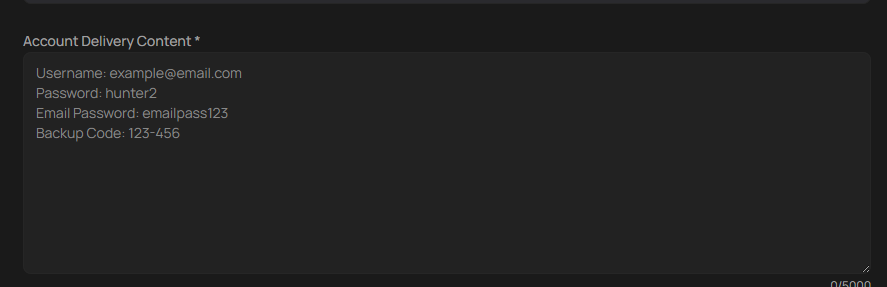
  • Formatting Your Account Info for Instant Delivery

    Clear well-organized account details make for a smoother experience for our buyers. Poorly written or unclear information increases the risk of disputes and cancellations, which will negatively impact your rankings on PlayerBay.

    Recommended Format:

    Additional Details to Include (If Applicable):

    Character name, security questions and answers, any extra passwords or PINs, codes and any other relevant information a buyer could need to access the account.

    Please review and update your existing listings to make sure your account delivery details follow this format. Any Listing that doesn’t comply may receive lower visibility, reduced platform ranking, or be subject to further moderation.

  • Why Do I Need to Verify My ID to Sell?

    All sellers on PlayerBay are required to verify their identify before listing any products. Sellers must be at least 18 years or older.

    Why We Require it:

    ID verification protects our buyers and helps prevent fraud on our platform. We enforce a 5-day money hold period for account sellers, and if an account is recovered after that hold period ends, PlayerBay reserves the right to take legal actions against the seller.

    Your Data Is Safe

    Legitimate sellers have nothing to worry about. Your personal data is handled and stored securely, never shared with third-parties, and only used for security purposes.

    Important: Only upload the required document photos during verification. Uploading random or unrelated images may result in account suspension.
  • Seller Guidelines | Top Ups & Subscriptions

    The following rules apply to all listings within the Top Up Categories, failure to follow these guidelines may lead to account restrictions, listing removals or permanent suspensions.

    Access and Permissions

    Only Verified sellers who have completed 250 or more successful sales and maintain a 98% positive feedback store are eligible to list in the Top-Up sections. The Top-up section carries a 0% seller fee on all sales.

    What Can Be Sold

    Only the following are allowed:
    1. In-Game Premium Currencies (Diamonds, V-Bucks, Robux)
    2. Top-Up Services (Battlepasses, skins, bundles.)

    What Is Strictly Forbidden:
    The following are not allowed within the Top-Up Sections;

    1. Account sales of any kind (Including Shared, Family, Pre-leveled or disposable gifting accounts.
    2. Misleading subscription Bundles (Offering 1 month renewable subscriptions instead of providing the full 3,6,12 months upfront.)
    3. Trial Products listed under regular or basic categories.
    4. Using third-party or unauthorized sources to fulfill top-ups
    5. Payments via restricted methods for manual top-ups (Stolen Cards)

    Compliance and Accuracy

    1. Accurate Listings: Every listing must describe exactly what is promised.
    2. Correct Categories: List products in the appropriate top-up sub-category.
    3. Service Legitimacy: All top-ups must be sourced through official distribution channels only. Use of bots, exploits, or unauthorized sellers is grounds for immediate suspension.

    Proof and Fullfillment

    1. Instant Proof of Fulfillment: You must provide evidence of delivery immediately after completing the order. Accepted proof includes:
      • A Game Screenshot showing the characters ID and updated balance, quantity before and after (for upgrades).
      • Transaction receipt from the game or platform.
    2. Manual Top-Up Requirements: Manual Top-Ups must include the buyer’s character ID and the payment confirmation.

    Order and Complaint Handling

    1. Delivery Timeframe: Orders must be fulfilled within the delivery window stated on your listing.
    2. Disbursement Period: All transactions within a Top-Up category are subject to a 3 day reserve period before funds can be released.

    Transaction Management

    1. Keep Records: Maintain clear, verifiable records for every order. Missing proof may result in undesirable dispute outcomes.
    2. Reserve Funds: A percentage of your earnings may be temporarily held until order verification is complete, depending on the product or program.

    Violations and Penalties

    1. Misleading Listings or Offsite Offers: First offense results in a temporary suspension. Second offense results in a permanent suspension and forfeiture of account balance.
    2. Use of Unauthorized Top-Up Sources: Immediate suspension on first offense.
    3. Harassment, Fraud, or use of Stolen Payment Methods: Immediate Suspension on first offense.
    PlayerBay reserves the right to deny appeals and withhold balances in cases of confirmed policy breaches.

  • User Feedback

    Feedback is a core part of the buyer-seller relationship on our platform. It gives buyers a way to share their experience and helps sellers understand how well they are meeting expectations. As a seller, delivering a great customer experience should always be your top priority. Your feedback store is a key indicator of your service quality, we recommend maintaining a score of 90% or higher to reflect strong buyer satisfaction.

    How to Prevent Negative Feedback

    Most Negative Feedback can be avoided with a little care, clear communications, and a little extra effort.

    1. Keep your Product Ready: Maintain your stock, and check it regularly to make sure items are available and ready to deliver, this avoids any delays and last minute cancellations that would fustrate buyers.
    2. Stay Responsive: Reply quickly to any questions or concerns. Buyers want to know they are being heard.
    3. Lead with Empathy: Treat every buyer with patience and respect. A calm, understanding approach can resolve most issues before they even turn into negative user feedback.
    4. Offer Compensation When Needed: If something goes wrong, such as a delay, consider offering a small bonus, discount or even a refund. A thoughtful gesture can go along way with rebuilding buyer’s trust.
    5. Handle Disagreements Respectfully: When conflicts come up, try to meet the buyer halfway. A fair, cooperative solution usually leads to a better outcome for everyone involved.
    6. Manage your Availability: If you expect delays or need time off, pause your listings or adjust your delivery window. Setting clear expectations upfront prevents buyers from being disapointed.

    When Negative Feedback May Be Removed

    We Value honest feedback here on PlayerBay, it helps keeps us transparent and trustworthy. Negative feedback is not removed simply because and issue was resolved, or because a seller disagrees with the review. However, there are situations where feedback may be removed because it clearly violates our rules.

    Feedback may be eligble for remove it involves any of the following:

    1. Extortion or Blackmail (e.g., a buyer leaves a negative review and demands free goods to change it.)
    2. Coordinated or Fraudulent reviews intended to harm a seller.
    3. Duplicate feedback where the issue is reported multiple times unnecessarily.
    4. Abusive Content
    5. Personal Insults
    6. Offensive Language

    When Negative Feedback Will Not Be Removed

    Feedback will remain if it reflects the buyer’s genuine experience or concerns about the seller, including issues with quality, delivery time, or customer service and communications. This applies even if the refund, replacement, or compensation was provided.

    A Note to Sellers

    Open communications and cooperation with Buyers goes a long way. Working together to resolve any issues and learning from feedback helps improve your services and builds long-term platform trust.

    To request removal of negative feedback, please contact our support team with details of your case. We will review it carefully, but please note that feedback can only be considered for removal if it matches one of the situations listed above.

  • How to Deliver Account Information to a Buyer

    Where to Share Account Details

    All account login details should be delivered through the PlayerBay order chat, which provides secure, end-to-end encrypted communications between you and the buyer. Never share account details through external platforms or off-site messaging.

    What Information to Provide.

    You should provide the login username, password, email (if present) and any security questions answers (if present).

    Remember, PlayerBay only permits the sale of full-access accounts, so make sure the buyer has everything they need to take complete control of the account.
  • Keyword Rules FAQ

    We have put together this FAQ to clarify how keywords should be used in your listings. These guidelines exist to keep search results clean, fair, and useful to everyone.

    Why Do We Have Keyword Rules?

    Our primary goal is to help buyer find exactly what they are looking for and to help sellers connect with those buyers more effectively. Over time, certain keyword practices – like adding symbols, misspellings, or even unrelated tags create cluttered confusing search results. That doesn’t actually improve your visibility, it just makes the buyers experience worse. Clear guidelines keep things fair, easy to browse, and trustworthy for everyone on PlayerBay.

    What Counts as Keyword Abuse?

    Keyword abuse includes any formatting or language tricks designed to draw extra attention or appear in unrelated searches, here’s what to avoid.

    1. Special Characters and Formatting Tricks: Don’t use symbols, underscores, or decorative characters to make you listings stand out visually. Examples like “xX_SweetAccount_Xx,” “CHEAP_G-OLD!!!!” don’t help with ranking, they just make the results harder to scan and reduce trust on PlayerBay. Emojis are fine in moderation.
    2. Mispelled or Altered Keywords: Don’t replace letters with numbers or intentionally misspell words to capture extra search results. Examples like “g0ld,” “acc0unt,” R4r3″ aren’t how buyers search, and they make your listings look less credible.
    3. Keyword Stuffing: Don’t overload your title or description with the same keyword repeated over and over. Something like “GP GP GP GP GP CHEAP WOW GREAT PRICE” is hard to read, and doesn’t improve visibility. You can use each keyword or keyword variation a maximum of two times, once in the title, and once in the description, or any other natural combination.
    4. Irrelevant or misleading Keywords: Don’t include games or terms that have nothing to do with your actual listing. Selling a Valorant account but tagging “CS2,” or “Fortnite” wastes buyers’ time, and damages platform trust.

    What Does a Good Listing Look Like?

    A Strong listing uses clear, properly spelled keywords that match the product being sold. No Decoration, symbols or formatting gimmicks. A short, natural sounding title. And a helpful description with only relevant terms. Think of it this way: The best listings are written in a way a buyer would expect to read them, not the way a seach engine would.

    Will Keyword Tricks Help Me Rank Better?

    Short Answer, No. Listings that misuse keywords are more likely to be removed or result in account suspensions. This kind of formatting clutters the marketplace and makes it hard for the buyers to find what they actually want which hurts everyone, including you.

    What Happens If I Don’t Follow the Rules?

    To protect our buyer’s experience, listings with keyword abuse may be removed from search results, result in account warnings or suspensions, or lead to a permanent ban in the case of repeated abuse. We’d much rather help you fix your listings than take action, so if you’re unsure, update them pro-actively.